Edge Node Behavior When DNS Resolution Fails
less than a minute
Symptoms
- The node triggers the DNS Resolution - DNS resolution failed event type.
- The node overview page will display a configuration alert stating “Node is having DNS resolution issues”.

- The DNS column (optionally visible) in the Nodes table in the Portal shows “Un-healthy” for the edge node.

- Node does not connect to the Portal
- Packet captures show repeated DNS queries for hosts such as zuul.trustgrid.io and gatekeeper.trustgrid.io but no response
Cause
- DNS servers configured on edge node are not accessible
- A firewall is blocking TCP/UDP port 53 between the edge node and the configured DNS
- DNS servers configured on edge node cannot resolve public DNS entries for the trustgrid.io domain
Troubleshooting Steps
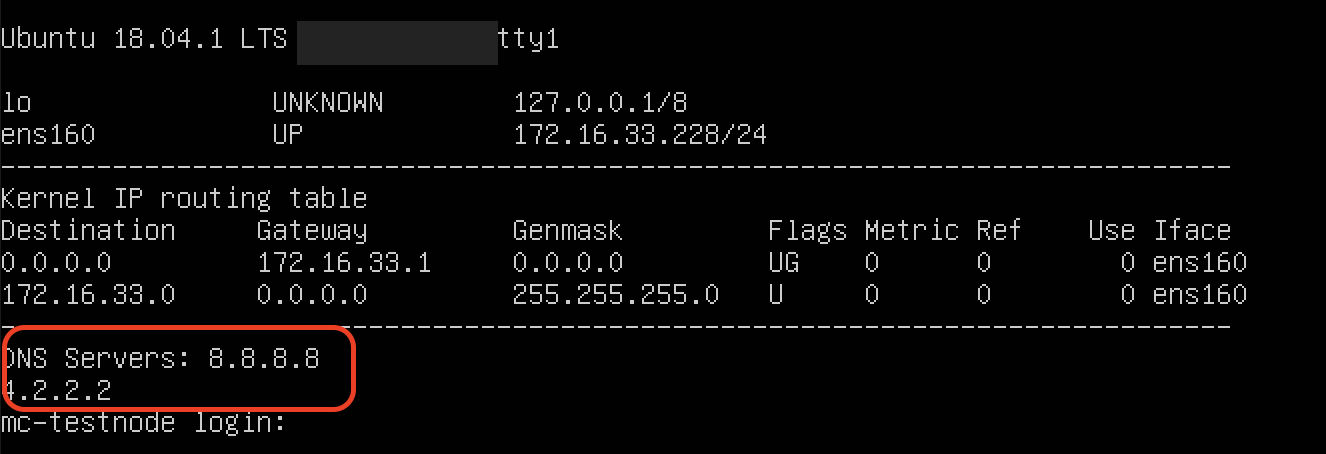
- Determine the configured DNS Servers - Connecting a monitor to the node will display the current IP configuration including the DNS Servers as shown below:
- (If possible) Capture traffic between the edge node and the internet and confirm you see both a DNS query (usually for zuul.trustgrid.io) AND response

Resolution
- Ensure the edge node can make TCP/UDP connection on port 53 to the configured DNS server
- If using private DNS server ensure they have forwarders configured that can resolve trustgrid.io DNS records
- If configured DNS servers are incorrect the node will need to be manually reconfigured. Contact Trustgrid Support for assistance
Feedback
Was this page helpful?
Glad to hear it! Please tell us how we can improve.
Sorry to hear that. Please tell us how we can improve.